Your AI coding assistant can see your code but not your organization. You’re the one synthesizing the Slack threads, Jira tickets, Confluence pages, Salesforce records — the hundred other places where context actually lives.
What I call the ‘Reach’ pattern is a personal CLI that borrows your real browser sessions to call web APIs on your behalf. Your AI assistant gets structured skill files that teach it to drive that CLI — searching all your services in parallel and producing polished artifacts, including new software.
I think of it as inverted SaaS: the software is on my machine, reaching out.
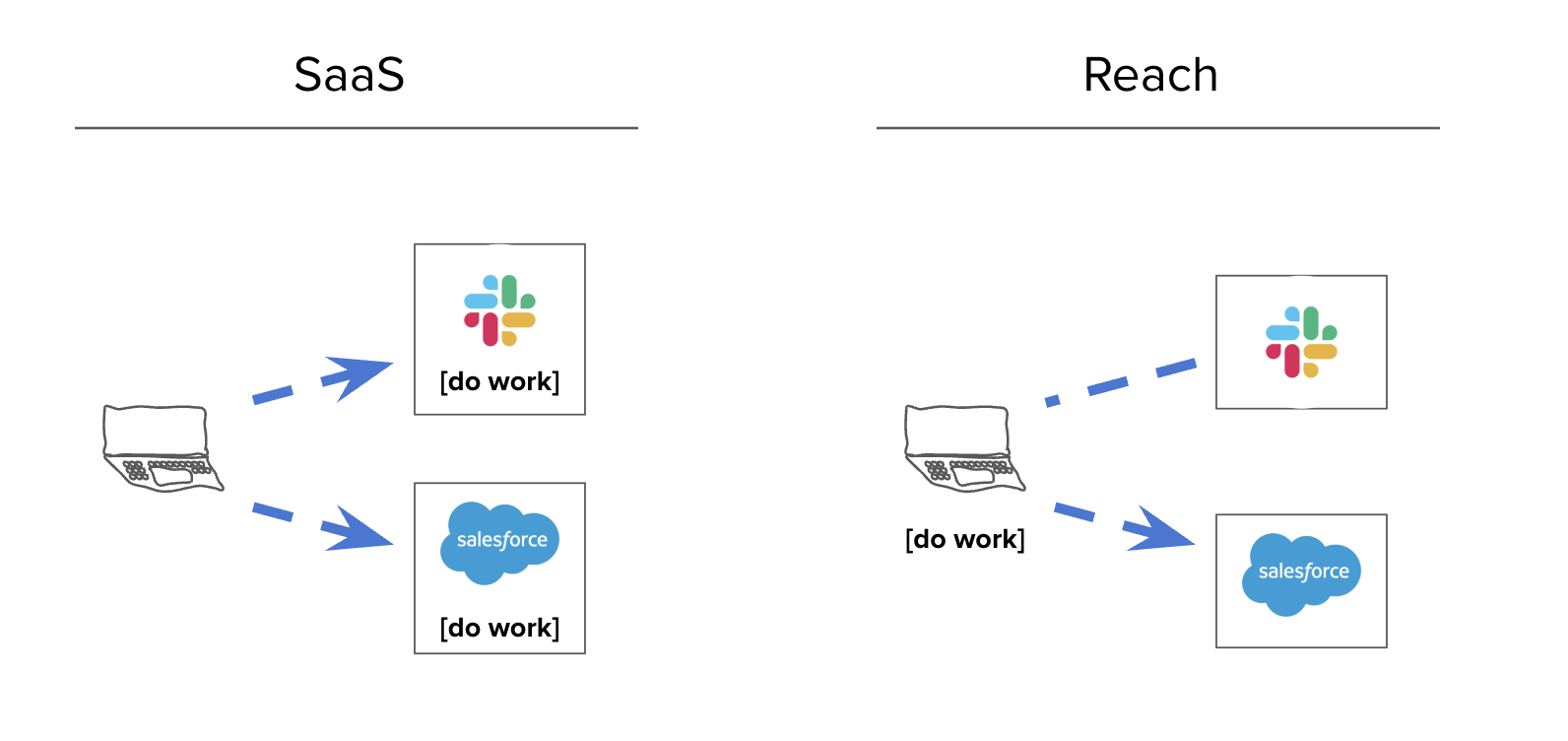
Prompting a system like this gets you:
- Root-cause analysis of any incident — it has access to your repos, monitoring, chat, and paging all at once
- Documentation better than the handwritten stuff — it synthesizes official docs with what people actually said in Slack and what’s in the source code
- Self-reflection and coaching from your DMs and private docs
- Software development with full organizational context
All of those are useful. That last one is the real killer.
We say the hard part about engineering isn’t the code, it’s the people and the organization, right? Well, what if your editor knew how to navigate the organization? What if it had access to everything anyone at your company has ever written — and a decent LLM?
Replacing vendors, one by one
I tried this out the other day by asking my editor “Look at all the ways we use [vendor] here, look at all the code that connects to it, and build a replacement. Put it in a private repo.”
6 hours later, with some followup prompts like “review this as if you were [CTO] and [most skeptical senior engineer] and make it flawless”, I had a working replacement for a major data vendor.
It didn’t just work as software, it worked as a solution for my company. It did product research and wrote a little PRD in its head while connecting documented problems to a generated solution.
Folks have asked me for the code but, weirdly, it’s easier for me to show you how to build it yourself.
Prompt 1
Dress it up how you want. Ask for a cool logo. Iterate on the extension.
Prompt 2
This CLI is now able to be you poking around websites.
Prompt 3
You’re exporting everything out of SaaS now.
Prompt 4
At this point you’ve entered whatever AI revolution they’ve been warning us about.
Or, if you want to skip all that, I’ve asked one of my Reach apps to help you bootstrap yours. Just tell it the URL of this webpage and ask it to build you the same thing. It can read the instructions and follow them.
The Reach Pattern
Build a local CLI tool called reach in a monorepo. Four components: a compiled CLI binary, a Chrome extension, AI context files, and a Markdown-to-HTML artifact renderer.
The user will tell you which services to integrate. Classify each into one of these auth categories:
| Category | How it works | Examples |
|---|---|---|
| Cookie auth | Export cookies from Chrome via the extension. CLI injects as Cookie: headers. |
Most SaaS with a web UI: Slack, Jira, Salesforce, HubSpot, Notion, Linear, internal dashboards |
| OAuth | One-time browser flow, store refresh token, auto-refresh. | Google (Drive, Gmail, Calendar), Microsoft 365, Salesforce API |
| API key | User pastes a token during setup. CLI injects as Authorization: Bearer. |
Gong, Datadog, PagerDuty, Stripe, OpenAI, Linear API, Notion API |
| Existing CLI | Shell out to an installed CLI. | gh, terraform, aws, kubectl, sf |
Build in this order. Each step depends on the previous ones.
Step 1: Credential Storage and Bridge Server
Two tiers of sensitivity → two storage backends:
- macOS Keychain — for true secrets that grant persistent access beyond a browser session: OAuth refresh tokens and API keys. These are long-lived credentials that could cause real damage if leaked. One Keychain entry per OAuth provider (auto-refresh before expiry; one token can cover multiple APIs from the same provider, e.g., all Google APIs share one token). API keys stored as a single JSON map of service→token pairs. Each service has a
./reach {service} setupsubcommand. - Disk with
0600permissions — for cookie files at~/.config/reach/cookies/{domain}.json. Cookies are session-equivalent data, the same sensitivity as your browser’s cookie jar. Do NOT use the Keychain for cookies — it prompts for a password on every access, which makes automated use impossible.
For Google Drive (and other Google APIs): you need a Google Cloud project with the relevant APIs enabled. Create OAuth 2.0 credentials (Desktop app type) and download client_secret.json. Then run reach gdrive setup, which reads that file, opens a browser for consent, and stores the refresh token in the Keychain. This is a one-time setup but it’s the most involved auth category — budget a few minutes for the Cloud Console.
Bridge server on localhost:9877: receives POST /store-cookies from the Chrome extension and writes to the cookie directory. Must include Access-Control-Allow-Origin: * and handle OPTIONS preflight — the extension posts cross-origin and this will fail silently without CORS headers. Runs as a background process.
./reach auth status output:
Cookies:
  ✓ mycompany.slack.com         42 cookies   stored 2h ago
  ✓ mycompany.atlassian.net     18 cookies   stored 1d ago
  ✗ app.hubspot.com             not exported

OAuth:
  ✓ Google (Drive, Gmail, Cal)  expires in 47m

API Keys:
  ✓ gong
  ✓ datadog
  ✗ pagerduty                   not configured
This is the first thing the AI checks before any task. It must be machine-parseable so the AI knows what’s working and what to tell the user to fix.
Step 2: Chrome Extension
Manifest V3 (not V2 — deprecated). Use "<all_urls>" in host_permissions so the extension can export cookies for any domain without per-site manifest changes. User installs via chrome://extensions → Developer Mode → Load Unpacked.
Popup shows a list of all previously exported domains with cookie count and age (e.g., “slack.com — 42 cookies, 2h ago”). The current tab’s domain is highlighted at the top with an “Export Cookies” button. On click: chrome.cookies.getAll() for the domain and parent domains, POST to bridge server.
Step 3: HTTP Client
A single HTTP client struct with two constructors: one that loads cookies from disk (for cookie-auth services), one that takes a bearer token (for OAuth/API-key services). On 401/403, print a remediation message telling the user exactly what to do.
Step 4: Service Modules
One module per service. Each has subcommands (reach {service} search "query", reach {service} show ID, etc.) and supports --output text|json|markdown.
To find API endpoints for cookie-auth services: open the service in Chrome DevTools Network tab, perform a search, and look at the XHR requests.
Gotcha: some services embed a CSRF/session token in page HTML alongside cookies. If cookie-auth requests return 401 with valid cookies, fetch the page first, extract the token (look in <meta> tags, inline scripts, or window.__CONFIG__), then include it in API calls. Slack’s xoxc- token is the famous example but many services do this.
For existing CLIs (gh, sf, aws), just shell out and parse the JSON output.
Example output for ./reach linear search "auth bug":
LINEAR  3 results for "auth bug"

  ENG-4521  [Bug] Auth token refresh fails on expired sessions
            Assignee: Maria Chen  Status: In Progress  Updated: 2d ago
            https://linear.app/myco/issue/ENG-4521

  ENG-4499  [Bug] OAuth callback drops state parameter
            Assignee: James Wu    Status: Done         Updated: 1w ago
            https://linear.app/myco/issue/ENG-4499

  ENG-4312  Auth bug in mobile SSO flow
            Assignee: —           Status: Backlog      Updated: 3w ago
            https://linear.app/myco/issue/ENG-4312
Compact, scannable, with direct links. Not raw JSON. The --output json flag gives raw API results for piping; --output markdown gives the same content formatted for artifact documents.
Step 5: The Research Command
Searches all configured sources in parallel for a single topic.
reach research "topic" [--sources svc1,svc2] [--depth quick|normal|exhaustive]
Spawns one thread per source. Each returns results in a common shape: source, title, url, snippet, author, date. After all threads complete, cross-references to find key people (who appears across sources), key locations (which channels/projects/repos), and builds a chronological timeline.
Must be parallel, not sequential. Must handle individual source failures gracefully — log it, skip it, continue with the rest.
The Markdown artifact for ./reach research "auth migration" should look like:
# Research: auth migration

Searched 5 sources in 3.2s (4/5 succeeded, HubSpot: session expired)

## Key People
- **Maria Chen** — 12 mentions (Linear: 5, Slack: 4, Confluence: 3)
- **James Wu** — 8 mentions (Slack: 4, GitHub: 3, Linear: 1)

## Key Locations
- **#eng-platform** (Slack) — 9 results
- **Auth & Identity** (Confluence space) — 4 results
- **myco/auth-service** (GitHub) — 3 results

## Timeline
| Date | Source | Item |
|---|---|---|
| Feb 24 | Slack | Maria in #eng-platform: "auth migration cutover Thursday" |
| Feb 23 | Linear | ENG-4521: Auth token refresh fails (In Progress) |
| Feb 21 | Confluence | "Auth Migration Runbook v2" updated by Priya Sharma |
| Feb 20 | GitHub | PR #847 merged: "Migrate OAuth provider" by James Wu |
| ... | | |

## Slack (9 results)
[results with snippets and links]

## Linear (6 results)
[results with status, assignee, links]

## Confluence (4 results)
[results with author, last-updated, links]

## GitHub (3 results)
[results with PR/commit info, links]

---
*Slack ✓  Linear ✓  Confluence ✓  GitHub ✓  HubSpot ✗ (session expired)*
This artifact gets saved to artifacts/ and rendered to HTML.
Step 6: AI Context Layer
This step creates files that your AI coding assistant reads as reference documentation. You are writing docs, not executable code.
.cursorrules (or CLAUDE.md for Claude Code):
# Reach — Personal Research CLI

Local CLI for searching [Slack, Linear, Confluence, Google Drive, Gong].

## Before Any Task
Run `./reach auth status`. If any service shows ✗, tell the user what to fix.

## Commands
./reach research "topic"                     # Search ALL sources
./reach research "topic" --depth exhaustive  # Deep search with pagination
./reach slack search "query"                 # Slack messages
./reach slack thread "permalink"             # Full thread
./reach linear search "query"               # Linear issues
./reach linear issue ENG-1234               # Specific issue
./reach confluence search "query"            # Confluence pages
./reach gdrive search "query"                # Google Drive
./reach gong search "query"                  # Gong transcripts
./reach auth status                          # Check credentials

## Output
Save research to artifacts/. After writing any .md file there,
run `bin/render <file>` to render as styled HTML and open in browser.

## Rules
- Run independent CLI commands in parallel for speed.
- Never read or print files under ~/.config/reach/.
AGENTS.md — a skill registry listing each skill with a trigger condition and file path:
## Skills
### Available skills
- reach-slack: Search Slack messages and threads. Use when the user asks
  about Slack conversations. (file: .cursor/skills/reach-slack/SKILL.md)
- reach-linear: Search Linear issues. Use when the user asks about tickets
  or bugs. (file: .cursor/skills/reach-linear/SKILL.md)
- reach-research: Cross-source research. Use when the user asks to research
  a topic. (file: .cursor/skills/reach-research/SKILL.md)

### How to use skills
- If the request matches a skill, read that SKILL.md first.
- Only load skills relevant to the current task.
.cursor/skills/{name}/SKILL.md — one per service. Example:
---
name: reach-slack
description: Search Slack messages and retrieve threads.
---
# Slack

## Commands
./reach slack search "deployment issue"
./reach slack search "from:@maria.chen in:#eng-platform after:2025-02-01"
./reach slack thread "https://myco.slack.com/archives/C1234/p5678"

## Search Modifiers
- from:@handle — messages from a person
- in:#channel — messages in a channel
- after: / before: — date range
- has:link — messages with URLs

## Gotchas
- Search returns parent messages only. Use `thread` to see replies.
- Results ranked by relevance, not date. Add date modifiers for recency.
.cursor/rules/ — short .mdc files for cross-cutting constraints:
tool-preferences.mdc: prefer the CLI over direct API calls; run commands in parallel.security.mdc: never read or access paths under~/.config/reach/; never output tokens.
Step 7: Artifact Rendering
bin/render: a script that converts Markdown to styled, self-contained HTML with dark/light mode support and opens it in the browser. Use cmark-gfm or any GFM renderer. Output to artifacts/.html/. Gitignore both artifacts/ and artifacts/.html/.
Step 8: Build System
A Makefile with: all (deps + build + start bridge), start (bridge, idempotent), stop, status, extension (print install instructions), clean. Symlink the binary to ./reach at the repo root.
Failure Modes to Avoid
- Keychain is for tokens, disk is for cookies. OAuth refresh tokens and API keys go in the Keychain. Cookie files go on disk with
0o600permissions — same sensitivity as your browser’s cookie jar, but the Keychain prompts on every access which breaks automation. - Do add CORS to the bridge server.
Access-Control-Allow-Origin: *+ OPTIONS. Without it the extension fails silently. - Do use Manifest V3. V2 is deprecated.
- Some services need tokens beyond cookies. If cookie-auth returns 401, look for embedded CSRF/session tokens in page HTML.
- Do run research in parallel. Sequential is unusably slow.
- Do handle source failures gracefully. One expired session must not abort the entire search.
- Skill files are documentation. They teach the AI what CLI commands exist. No executable logic.
The Reach Pattern — because the best tools are the ones that meet you where you already are.
If you read this far on your own, welcome to the party. Software has never been softer.